
WordPress speed optimisation for slow, heavy sites
WordPress speed optimisation matters because a slow website loses visitors before they read a word. We find what is slowing yours down and fix it, with before and after scores.
- Fixed prices
- Reply within 1 working day
- No long contracts

On this page
- What WordPress speed optimisation fixes
- WordPress speed optimisation results
- How we speed up WordPress and Elementor sites
- Core Web Vitals and what Google measures
- Field data vs lab scores
- The layers WordPress speed optimisation tunes
- WooCommerce speed
- Keeping WordPress speed optimisation results
- WordPress speed optimisation starts with diagnosis
- WordPress speed optimisation for Elementor sites
- Common causes WordPress speed optimisation finds
- WordPress speed optimisation report
- WordPress speed optimisation and hosting choice
- Mobile speed first
- Image formats in WordPress speed optimisation
- WordPress speed optimisation for the LCP image and lazy loading
- Render-blocking CSS and JavaScript in WordPress speed optimisation
- Caching plugins for WordPress speed optimisation compared
- Object caching and database work in WordPress speed optimisation
- Measuring after the work
- A quick speed checklist you can run yourself
- Speed and rankings: what Google actually says
- Time to First Byte (TTFB) explained
- Fonts and WordPress speed optimisation
- Third-party scripts and WordPress speed optimisation
- How long WordPress speed optimisation takes
- Why we do not chase a perfect 100 score
- Who WordPress speed optimisation suits
- Why speed matters for SEO and enquiries
- Pricing
- WordPress speed optimisation: what you get
- Frequently asked questions
Key points
- WordPress speed optimisation starts with a free speed check, then a fixed quote.
- We fix what real users feel: Core Web Vitals, not just a lab score.
- Built for WordPress and Elementor sites, including WooCommerce.
- Before and after scores. No charge if your site is already fast.
What WordPress speed optimisation fixes
Most slow WordPress sites suffer from the same handful of problems: large images, too many plugins, no proper caching and heavy page builders loading code on every page. WordPress speed optimisation means finding which of these apply to your site and fixing them without breaking anything.
WordPress speed optimisation results
Real before and after scores from recent WordPress speed optimisation projects:
Fab Clinic
Aesthetics clinic, UK
Mobile13→73
Desktop65→84
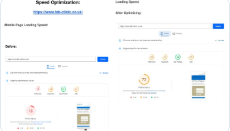
Google PageSpeed Insights performance score, before and after our work.
So Called Deals
Online shop, US
Mobile32→93
Desktop77→100
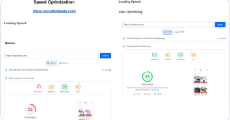
Google PageSpeed Insights performance score, before and after our work.
Gemstal
Gemstone shop
Mobile33→85
Desktop57→94

Google PageSpeed Insights performance score, before and after our work.
Protec Restoration
Restoration company, Portland (US)
Mobile69→93
Desktop after99

Google PageSpeed Insights performance score, before and after our work.
More examples on our work page.
How we speed up WordPress and Elementor sites
- Measure first. Mobile PageSpeed and Core Web Vitals for your key pages, saved as the “before”.
- Caching. Set up the right caching plugin for your server, such as LiteSpeed Cache on LiteSpeed hosting.
- Images. Convert to WebP, resize, and lazy-load everything except the first image on screen.
- Plugins and scripts. Remove what is unused, and stop scripts loading on pages that do not need them.
- Elementor settings. Turn on its built-in performance features and trim heavy widgets.
- Measure again. You get the “after” scores side by side.
More detail
Core Web Vitals and what Google measures
| Metric | What it means for visitors | Good |
|---|---|---|
| Largest Contentful Paint (LCP) | How quickly the main content, often the hero image or heading, appears | 2.5s or less |
| Interaction to Next Paint (INP) | How quickly the page responds to taps and clicks | 200ms or less |
| Cumulative Layout Shift (CLS) | How much things jump around while loading | 0.1 or less |
We also check Time to First Byte (TTFB), how quickly your server starts sending the page, because a slow server holds everything else back.
Field data vs lab scores
PageSpeed Insights shows two kinds of results. Field data comes from real Chrome users visiting your site (the Chrome UX Report) and is what Google uses. Lab data comes from a single test run in Lighthouse and is useful for finding problems. Small sites often have no field data yet, so we use lab tests in PageSpeed Insights, Lighthouse and WebPageTest, and judge success on both.
The layers WordPress speed optimisation tunes
Hosting and server
A current PHP version, LiteSpeed or similar web server, HTTP/3 and server-level caching. If your hosting is the bottleneck, we tell you honestly and recommend options.
Caching
Page caching so pages are served ready-made, browser caching for repeat visits, and object caching such as Redis where the host supports it.
Content delivery network (CDN)
A CDN such as Cloudflare serves files from locations near the visitor and can reduce load on your server.
Images
Converted to WebP (or AVIF where supported), resized to the size they are shown at, lazy-loaded below the first screen, and the main hero image loaded first.
CSS and JavaScript
Unused CSS removed, scripts deferred or delayed until needed, and scripts stopped from loading on pages that do not use them, using tools such as Perfmatters’ script manager.
Fonts
Fewer font families and weights, served from your own site where possible, with text shown immediately while fonts load.
Third-party scripts
Chat widgets, tracking tags and embedded videos are often the biggest slowdowns. We delay, replace or remove them where it makes sense.
Elementor settings
Elementor’s optimised markup and improved asset loading switched on, unused widgets and icon libraries disabled, and heavy sections simplified.
Database
Old revisions, expired temporary data and leftover plugin tables cleared, so the database stays lean.
WooCommerce speed
Online shops have extra weight: cart scripts on every page, large product images and many plugins. We apply the same layers, plus shop-specific fixes, while making sure the basket and checkout keep working perfectly.
Keeping WordPress speed optimisation results
Speed slips over time as new plugins, images and tracking tags are added. After the work, you get a short list of do’s and don’ts, and a monthly speed check is part of our Care Plus plan.
WordPress speed optimisation starts with diagnosis
We do not start by installing plugins. We start by finding the cause. A waterfall test in WebPageTest or Chrome DevTools shows every file the page loads, in order and how long each takes. That usually points straight at the problem: a slow server response, a huge hero image, a chat widget, an unused slider script or a font loaded from three places.
If you need to fix a slow WordPress site, guessing does not work. To fix slow WordPress site problems for good we first measure what is slow, then change only what the data points to.
WordPress speed optimisation for Elementor sites
Elementor sites are often slow for the same reasons: many widgets on one page, sliders and animations above the fold, unused icon libraries, and global settings left at defaults. WordPress speed optimisation on Elementor usually means switching on its performance experiments, replacing heavy widgets with simpler ones, removing unused fonts and icons, and loading the hero image first.
Common causes WordPress speed optimisation finds
- Uncompressed images several megabytes in size.
- Two or three caching or optimisation plugins fighting each other.
- Page builder add-on packs loading on every page.
- Third-party chat, booking or review widgets loading early.
- Out-of-date PHP on the hosting account.
- Google Fonts loaded in several weights that are never used.
WordPress speed optimisation report
You get a before-and-after table for your key pages: Largest Contentful Paint, Interaction to Next Paint, Cumulative Layout Shift, Time to First Byte and page weight, plus a plain-English list of every change made and anything we recommend for later, such as a hosting upgrade.
WordPress speed optimisation and hosting choice
Good hosting for a small WordPress site does not need to be expensive, but it should offer a modern PHP version, server-level caching such as LiteSpeed, enough memory for your plugins, and a data centre near your visitors. For UK businesses, a UK or nearby European server usually gives the best response times. Cheap, overcrowded shared hosting can make even a well-built site slow.
Mobile speed first
Most visitors to small business sites arrive on a phone, often on mobile data. PageSpeed Insights tests mobile on a slowed-down connection on purpose. WordPress speed optimisation that looks good on a desktop test but fails on mobile has not done its job, so we always judge results on mobile first.
Image formats in WordPress speed optimisation
| Format | Best for | Notes |
|---|---|---|
| JPEG | Photos | Widely supported; larger than WebP at the same quality |
| PNG | Graphics needing transparency | Often very large for photos; avoid for hero images |
| WebP | Most images | Usually much smaller than JPEG or PNG; supported by all modern browsers |
| AVIF | Photos where support allows | Smaller again, but slower to create; good with a fallback |
| SVG | Logos and icons | Tiny, sharp at any size |
Size matters as much as format: a 4,000-pixel-wide photo shown at 800 pixels wastes most of its data. WordPress speed optimisation always resizes images to the sizes they are actually shown at.
WordPress speed optimisation for the LCP image and lazy loading
Lazy loading delays images until the visitor scrolls near them, which saves data and speeds up the first screen. The one image that must never be lazy-loaded is the main image at the top of the page, because it is usually the Largest Contentful Paint element. We load it first, at the right size, and mark it as high priority so the browser fetches it straight away.
Render-blocking CSS and JavaScript in WordPress speed optimisation
Before a browser can show the page, it must download and read certain CSS and JavaScript files. If there are many of them, or they are large, the visitor stares at a blank screen. We reduce this by removing unused CSS, loading only the styles needed for the first screen first, deferring scripts that are not needed straight away and delaying non-essential scripts, such as chat widgets, until the visitor interacts with the page. Each change is tested, because delaying the wrong script can break menus, sliders or forms.
Caching plugins for WordPress speed optimisation compared
| Plugin | Best on | Notes |
|---|---|---|
| LiteSpeed Cache | LiteSpeed hosting (for example Hostinger) | Free; uses server-level caching, so usually the best choice on these hosts |
| WP Rocket | Most other hosts | Paid; easy to set up well |
| WP Super Cache | Simple sites on Apache or Nginx hosting | Free and light; fewer optimisation features |
| W3 Total Cache | Experienced users | Free; powerful but easy to misconfigure |
One caching plugin is enough. Running two at once is one of the most common causes of slow or broken WordPress sites.
Object caching and database work in WordPress speed optimisation
Page caching serves visitors ready-made pages, but logged-in users, carts and admin screens still hit the database. Object caching, such as Redis where the host supports it, stores the results of common database queries in memory. We also clear old post revisions, expired temporary data and leftover tables from deleted plugins, and check for large “autoloaded” options that slow every page.
Measuring after the work
Lab tests show the effect straight away. Real-user data in Google Search Console’s Core Web Vitals report updates over a rolling 28-day window, so the full picture appears a few weeks after the work. We check both and include them in your report.
We share both views so you can see the improvement for yourself.
A quick speed checklist you can run yourself
- Test your homepage and one service page in PageSpeed Insights on mobile.
- Check the size of your biggest images; anything over about 300 KB on a small site is worth compressing.
- Count your active plugins and deactivate any you do not use.
- Make sure only one caching plugin is active.
- Check your PHP version in your hosting panel; older versions are slower.
- Remove sliders and autoplay videos from the top of the page if you can.
If that does not fix it, WordPress speed optimisation by someone who does it every week usually will.
Speed and rankings: what Google actually says
Google treats page experience, including Core Web Vitals, as one signal among many. Relevance and content quality still come first: a fast page that does not answer the search will not outrank a slower page that does. Where pages are similarly relevant, the faster, smoother one has an edge, and visitors are far more likely to stay and enquire. That is why WordPress speed optimisation sits alongside content work, not instead of it.
Time to First Byte (TTFB) explained
TTFB is how long the server takes to start sending the page after it is requested. If it is slow, everything else waits. Common causes on WordPress are no page caching, too many database queries, slow or overcrowded hosting, and plugins that run heavy tasks on every visit. Page caching and a good host usually bring it down sharply.
Fonts and WordPress speed optimisation
Custom fonts make a site look professional but can delay text appearing. We limit sites to two font families and only the weights actually used, host font files on your own domain where possible, preload the main font, and make sure text shows immediately in a fallback font while the custom one loads, which avoids invisible text and layout jumps.
Third-party scripts and WordPress speed optimisation
| Script | Typical impact | Usual fix |
|---|---|---|
| Live chat widgets | Heavy JavaScript on every page | Load on interaction or on contact pages only |
| Embedded YouTube videos | Large player loads before play | Show a thumbnail, load the player on click |
| Review and booking widgets | Extra scripts and layout shifts | Reserve space, delay loading |
| Several tracking tags | Many small scripts adding up | Combine through one tag manager, remove unused tags |
How long WordPress speed optimisation takes
Most small sites are finished within a few working days of the free check and quote. We need a WordPress admin login, access to your hosting control panel, and a quiet time of day for changes if your site is busy. You receive the before-and-after report when the work is done.
Why we do not chase a perfect 100 score
A score of 100 in PageSpeed Insights is satisfying, but it is a lab result from one simulated visit. Chasing it can mean stripping out things that genuinely help visitors, such as a chat option, reviews or a map. Our aim with WordPress speed optimisation is to pass Core Web Vitals for real visitors on mobile, keep the page feeling instant, and keep every useful feature working. On most small sites that also produces a strong score.
Who WordPress speed optimisation suits
It suits any WordPress site that feels slow on a phone, fails Core Web Vitals in Search Console, or has grown heavy over years of plugins and page-builder changes. It is especially worth it before spending money on ads or SEO, because every visitor you pay to attract is more likely to stay on a fast site. If your site is already fast, the free check will say so and you pay nothing.
Why speed matters for SEO and enquiries
Google uses page experience, including Core Web Vitals, as one of many signals. Google explains the measures on web.dev. More importantly, visitors on phones leave slow sites. A faster site usually means more of the visitors you already have turn into enquiries.
Speed is one part of technical SEO. If you are not sure speed is your main problem, our £199 SEO audit checks everything at once.
In short, WordPress speed optimisation helps both your rankings and your enquiry rate.
Pricing
Every site is different, so we start with a free speed check and then give you a fixed quote. Speed set-up is already included in our Business and Growth website packages, and a speed check is part of the Care Plus support plan.
If the free check shows your site is already fast, we will tell you, and you will not be charged for anything.
WordPress speed optimisation: what you get
- Before and after mobile scores for your key pages.
- A list of every change we made, in plain English.
- A backup taken before any change, so nothing is lost.
- Advice on hosting if your server is the bottleneck.
WordPress speed optimisation is most effective on sites with large images and many plugins, which describes most small business sites built a few years ago. Expect the biggest gains on mobile, where most of your visitors are.
Once your site is fast, keeping it fast matters too. New plugins and big images creep back in over time, which is why a speed check is part of our Care Plus support plan.
Frequently asked questions
Why is my WordPress site slow?
The usual causes are large images, too many plugins, no caching and heavy page builder settings. Cheap, overloaded hosting can also be a factor.
Will you rebuild my site?
No. We optimise the site you have. A rebuild is only worth it if the theme itself is the problem, and we will tell you if so.
Can you guarantee a 100 PageSpeed score?
No. We aim for good Core Web Vitals and a fast real-world experience. Scores vary by page and by test.
Do you work on Elementor sites?
Yes. Most of the sites we speed up are built with Elementor.
How long does WordPress speed optimisation take?
Most small sites are done within a few working days after the free speed check and quote.
Will speed work break my site?
We take a full backup and test on a staging copy where possible, then check every key page and form after changes.
What is a good PageSpeed score?
Focus on Core Web Vitals passing rather than a perfect number. Scores vary between tests and pages.
Does hosting affect WordPress speed?
Yes. A slow server delays everything. If hosting is the bottleneck, we will tell you and suggest options.
Do you use a CDN?
Where it helps, usually Cloudflare. Small UK-only sites on good UK hosting may not need one.
Which caching plugin should I use?
On LiteSpeed hosting, LiteSpeed Cache. On most other hosts, WP Rocket or WP Super Cache. Only ever run one.
Why is my PageSpeed score different every time?
Lab tests vary with network and server load. Look at trends and at real-user Core Web Vitals in Search Console.
Will speed work affect my Google rankings?
It can help, especially if your site was very slow, but relevance and content matter more. The bigger gain is usually more visitors turning into enquiries.
Do I need to change my theme?
Usually not. Most speed problems come from images, plugins, scripts and hosting. If the theme itself is the problem, we will tell you and explain the options.
Can you speed up WooCommerce shops?
Yes. We apply the same layers plus shop-specific fixes, and test the basket and checkout carefully afterwards.
Do you need my hosting login?
Usually yes, to check PHP version, server caching and resources. You can create a separate user for us and remove it afterwards.
Is WordPress speed optimisation a one-off job?
The main work is one-off. Keeping the site fast afterwards is about not adding heavy plugins and images, and a monthly speed check is part of our Care Plus plan.

Your contact
Areeba Tariq, Client Manager
Calls, WhatsApp, quotes and updates: 07438 839864

Does the work
Abdul Hannan, Lead SEO / WordPress Engineer
With Hamza Bhatti, developer. Meet the team
Want a straight answer about your website?
Book a free 20-minute call: send us a WhatsApp message or call. Fixed quote, no obligation.